





Design in code and team processes
I brought AI agents into how we work in Figma and code. Together with our Head of Design, I started building the design system in code.
Rafeeq
A super-app in Qatar with food delivery, grocery and a marketplace.
How it started. I was the first at Rafeeq to suggest that designers work with code. The idea was to use Claude to build components, prototypes and even whole flows, and hand them to developers as code.
At first, we only got the go-ahead for components, and we could connect Claude to our work in Figma, so I started there.
At the same time, our Head of Design started building components in a separate showcase project. Developers later moved it to GitLab and turned it into the design system the whole team now works on.
The components I built
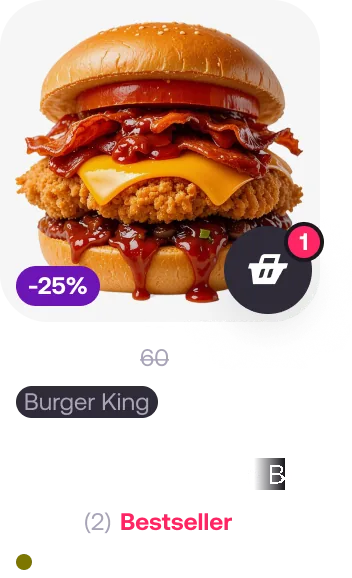
We build the system together. I built a large part of the components myself, including vendor cards, product cards, text fields, steppers and navigation.
The vendor card has many variants, states and properties you can switch on and off. It has to fit different content in Food, Grocery and Marketplace. The product card also has to work in every vertical.

Move the cursor: wireframe on the left, the card on the right.
Starting in Figma
I set up a way to build components in Figma with an agent. It finishes them, adds missing states and prepares showcase frames with documentation.
It runs on a shared skill that we keep updating as a team to fit how we work. Its main rules are the same for building components in Figma and for moving them into code:
- 1.No hard-coded values: everything is tied to tokens and the design system’s rules.
- 2.Document every component in the same format.
- 3.Ask what the component is for before adding states or changing its structure.
- 4.Propose the work first, then build it.
The last two matter because an agent can make something that looks finished but doesn’t fit the use case. Finding those mistakes later takes time. And tokens.
Moving to code
When we got access to the design system in code, we started moving our components there. Our Head of Design and I set up how to do it: a dedicated commit for each component, a merge request, then building and checking the component in code.
It became the team’s standard way to make components: where each one comes from, how it’s described and how it’s built. Our Head of Design later turned it into component contracts. I showed the whole team how it works, and now everyone builds components.
Then I started reviewing them. I made a separate review skill for this. It checks everything, from product flows to corner cases and accessibility. I’ve reviewed dozens of components with it.
A right-to-left copy of a screen in one click.
A plugin for RTL layouts
Converting layouts to right-to-left was a repetitive part of our work, and I wanted to automate it. I built a Figma plugin that relies on our design system: it switches each component to its right-to-left version and mirrors the rest of the layout.
The plugin handles RTL conversion now. I’m working on built-in translation that takes the screen’s context into account and follows our UX rules and the brand’s tone of voice.
What changed, and what’s next. Developers now use the design system and say it makes their work easier and faster. The team also uses the Figma structure and handoff template. I don’t have a measured time saving to show yet.
We still don’t have access to the main codebase. Next, we’re trying to agree on working on complete product flows. For the RTL plugin, the next step is AI translation into Arabic.
Next case
Pillbox — my iOS app
I designed and built an iOS app with AI, from the idea and user flows to the App Store release.